Digitally sign your PG, rental, and other property-related documents securely using Aadhaar-based eSign.
In today's digital-first rental and accommodation ecosystem, signing agreements no longer needs to involve printing documents, physically signing every page, scanning them, and sending them back.
With Aadhaar-based eSign, eligible individuals can digitally sign documents using their Aadhaar-linked mobile number and OTP. This makes the document-signing process faster, paperless, and convenient for both tenants and property managers.
On PGfy, digital documentation can be integrated into the tenant onboarding and property-management journey, helping reduce paperwork while creating a structured digital record of the agreement.
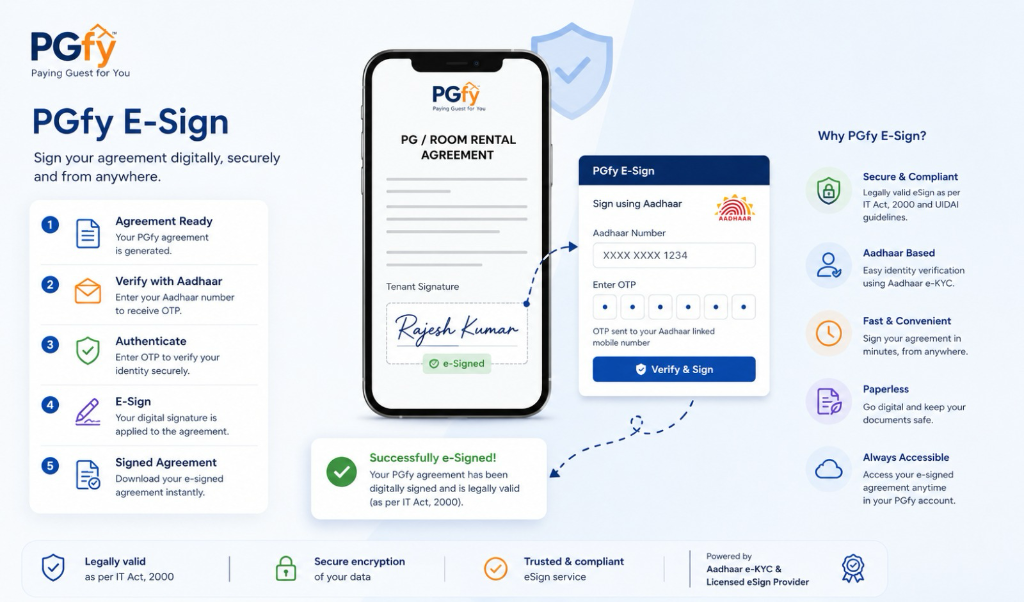
What is Aadhaar eSign?
Aadhaar eSign is an electronic signature mechanism that allows an individual to digitally sign a document after authentication using Aadhaar-based identity verification.
The signing process generally involves:
Aadhaar / Virtual ID → OTP Authentication → Digital Signature → Signed Document
Instead of physically signing a printed agreement, the signer authenticates themselves electronically and applies a digital signature to the document.
Aadhaar eSign is designed to provide a higher level of identity assurance than simply typing a person's name or uploading an image of a signature.
Why is Aadhaar eSign useful for PG and Rental Agreements?
PGs, hostels, co-living properties and rental accommodations frequently require tenants to complete documentation before moving in.
Traditionally, this may involve:
- Printing the agreement
- Signing multiple pages
- Scanning the document
- Sending documents over email or WhatsApp
- Manually maintaining records
- Storing physical copies
- Following up with tenants for missing signatures
A digital eSign workflow can simplify this process considerably.
For example:
Tenant books a room → KYC is completed → Agreement is generated → Tenant reviews agreement → Tenant completes eSign → Signed agreement is stored digitally
This can make the onboarding process faster and easier for everyone involved.
How Aadhaar eSign Works
The exact user interface may vary depending on the eSign service and document workflow, but the general process is straightforward.
Step 1: Document is prepared
The property manager creates or initiates the required agreement or document. For example:
- PG Agreement
- Rental Agreement
- Accommodation Agreement
- Leave & License Agreement
- Tenant declaration
- Property rules and undertaking
- Other digitally signable documents
The required details are populated into the document.
Step 2: Tenant receives the document
The tenant is provided access to review the document before signing. The tenant should carefully check important details such as:
- Tenant name
- Property name
- Property address
- Room/bed details
- Rent
- Security deposit
- Agreement duration
- Notice period
- Refund conditions
- House rules
- Other terms and conditions
The tenant should only proceed with signing after reviewing and understanding the document.
Step 3: Tenant chooses the eSign option
At the signing stage, the tenant can select the applicable digital-signature method provided in the signing workflow. For Aadhaar-based eSign, the signer is redirected or connected to the authorised eSign authentication process.
Step 4: Aadhaar authentication
The signer generally provides their Aadhaar number or Virtual ID as required by the eSign service. An OTP is then sent to the mobile number registered with Aadhaar. The signer enters the OTP to authenticate their identity.
Step 5: Document is digitally signed
After successful authentication, the digital signature is applied to the document. The completed document can then be returned to the relevant parties as a digitally signed document.
Is Aadhaar eSign legally valid?
Electronic signatures can have legal recognition in India when they are performed through mechanisms and service providers operating in accordance with the applicable legal and regulatory framework.
A properly implemented Aadhaar-based eSign process can provide significantly stronger evidence of the signer's identity and consent than simply inserting a scanned signature image into a PDF.
The legal enforceability of any particular agreement, however, depends on several factors, including:
- The nature of the document
- Applicable laws and regulations
- Proper execution of the agreement
- Authentication and signature process
- Applicable stamp-duty requirements
- Registration requirements, where applicable
- The terms of the agreement itself
eSign does not automatically replace stamp duty, registration, notarisation, or other legally required formalities where those requirements apply.
Therefore, tenants and property managers should ensure that the complete agreement process complies with the applicable requirements for their state and type of document.
Aadhaar eSign vs a Normal Electronic Signature
It is important to understand that not every electronic signature provides the same level of identity verification.
Simple electronic signing
A basic electronic signing workflow may involve:
- Clicking "I Agree"
- Typing a name
- Drawing a signature
- Uploading a signature image
- Using a checkbox or similar confirmation
These methods can be useful for many digital workflows, but the identity verification associated with them can be different from Aadhaar-based eSign.
Aadhaar-based eSign
Aadhaar eSign introduces an additional identity-authentication layer through Aadhaar-based authentication and OTP verification. This can be particularly useful when a property manager wants stronger assurance that the person signing the document is the intended tenant.
Benefits for Tenants
Aadhaar-based digital signing can make the rental and PG onboarding experience significantly easier.
- No printing required: Tenants can complete the signing process digitally without printing the agreement.
- Faster onboarding: Once the agreement is ready, the tenant can complete the signing process remotely. This can be particularly useful when the tenant is relocating from another city.
- No physical paperwork: The digitally signed agreement can be retained electronically instead of maintaining physical copies.
- Easy access to documents: Tenants can retain a digital copy of their signed agreement for future reference.
- Identity-linked signing: The authentication process provides stronger assurance regarding the identity associated with the signature.
- Convenient for remote move-ins: A tenant does not necessarily need to be physically present at the property merely to complete the document-signing process.
Benefits for Property Managers
Digital signing can also significantly simplify property operations.
- Faster tenant onboarding: Property managers can reduce the time between booking and completion of documentation.
- Reduced paperwork: There is less dependence on printing, scanning and physically storing agreements.
- Centralised digital records: Signed documents can be associated with the relevant tenant and property record.
- Easier document retrieval: Property managers can retrieve agreements when required instead of searching through physical files.
- Better operational visibility: Digital workflows can provide a clearer status of Agreement generated, Agreement sent, Pending signature, Signed, and Completed.
- Reduced follow-ups: Automated reminders and digital workflows can reduce the need to manually contact tenants regarding incomplete documentation.
Aadhaar eSign in the PGfy Tenant Journey
PGfy can bring digital documentation into the same journey that tenants already use for discovering and booking accommodation.
A typical workflow can look like:
Search PG → Select Property → Book Bed/Room → Complete KYC → Review Agreement → eSign → Complete Onboarding → Move In
This creates a more seamless digital experience for tenants.
For property managers, the corresponding workflow can be:
Receive Booking → Verify Tenant → Generate Agreement → Send for Signing → Track Signature → Store Signed Agreement → Complete Move-In
What Does the Tenant Need?
The requirements can vary depending on the specific eSign service and document workflow. Generally, the tenant should have:
- A valid Aadhaar number or Virtual ID, where applicable
- Mobile number registered with Aadhaar
- Access to the OTP sent during authentication
- Correct personal details
- A document that is ready for signing
The tenant should also carefully review the document before completing the signature.
What Should Tenants Check Before Signing?
A digital signature is still a signature. Therefore, do not sign a document simply because it has been sent through a digital platform.
Before signing, check:
- Personal information: Full name, Contact details, Identification information
- Property information: Property name, Complete address, Room/bed number, Occupancy type
- Financial information: Monthly rent, Security deposit, Maintenance charges, Electricity or utility charges, Other applicable fees
- Agreement conditions: Start date, End date, Notice period, Lock-in period, Cancellation conditions, Deposit refund conditions
- Property rules: Visitor policy, Check-in/check-out rules, Food/mess rules, Smoking/alcohol restrictions, Damage and penalty provisions, Other rules
If anything is unclear, the tenant should ask the property manager for clarification before signing.
What Should Property Managers Check Before Sending an Agreement?
Property managers should ensure that the agreement contains accurate information before initiating the signing process. Verify:
- Tenant's legal name & contact details
- Property details & Room/bed allocation
- Rent amount & Security deposit
- Agreement period & Notice period
- Applicable charges & Refund terms
- Property rules & Required signatures
- Applicable stamp-duty requirements
Incorrect information can create unnecessary disputes later.
Is Aadhaar eSign the Same as e-Stamping?
No. eSign and e-stamping are different processes.
- eSign: eSign is related to electronically signing/authenticating a document.
- e-Stamping: e-stamping is related to payment/evidencing of applicable stamp duty on a document.
Depending on the agreement and applicable state requirements, a rental or PG agreement may require appropriate stamping in addition to digital signing.
eSign ≠ e-Stamping
Both may form part of a complete digital agreement workflow, but they serve different purposes.
Is Aadhaar eSign the Same as Registration?
No. Registration of a document, where legally required, is a separate legal process.
Whether registration is required depends on the nature of the agreement, duration, property, state law and other applicable requirements.
Therefore, property managers should not assume that digitally signing an agreement automatically means the document has been registered.
What Happens After the Document is Signed?
After successful completion of the signing process, the final document can contain information associated with the electronic signature and authentication process. Depending on the signing system, the document may also include:
- Signer's identity information
- Signature certificate information
- Date and time of signing
- Signature validation information
- Document integrity information
- Other audit or transaction information
These details can help the parties verify the authenticity and integrity of the signed document.
How Can a Signed Document Be Verified?
A digitally signed PDF can generally be inspected using a PDF reader that supports digital signatures. The signature information may allow the viewer to inspect details associated with the signing certificate and verify whether the document has been modified after signing.
A valid digital signature is designed to help establish:
Who signed → When it was signed → Whether the signed document was altered
The exact information available depends on the digital-signature and eSign implementation used.
Security and Privacy
Identity-based signing involves sensitive information, so security is extremely important.
Tenants should:
- Never share Aadhaar OTPs with another person
- Never disclose authentication OTPs to property staff
- Verify that they are using the intended signing process
- Review the document before signing
- Keep copies of important agreements
- Report suspicious requests
Property managers should also ensure that tenant documents and identity information are handled securely and accessed only by authorised personnel.
Common Questions
Can a tenant sign an agreement remotely?
Yes, where the applicable digital-signing workflow supports remote signing, a tenant can complete the signing process without physically visiting the property.
Does the tenant need to print the agreement?
Not necessarily. A properly implemented digital workflow can allow the agreement to be reviewed and signed electronically.
Does Aadhaar eSign require an OTP?
Aadhaar-based authentication generally involves OTP-based authentication using the mobile number associated with Aadhaar, subject to the eSign service's current process.
Can a property manager also digitally sign the agreement?
Yes, where the agreement workflow requires signatures from both parties, the property manager/owner can complete their designated signing step as well.
Can I download the signed agreement?
A completed digital agreement can generally be made available to the relevant parties for their records, depending on the platform and workflow.
Can the agreement be changed after signing?
A signed document should not be treated as an editable document. If material changes are required, the appropriate approach may be to create and execute a revised agreement or addendum rather than modifying the already signed document.
Is Aadhaar eSign mandatory for every PG agreement?
No. Whether a particular signing method is required depends on the agreement, parties, business process and applicable legal requirements.
A Paperless Future for PG and Rental Documentation
The rental and PG industry is moving towards a more digital operating model.
From: KYC → Booking → Agreement → eSign → Payment → Move-in → Tenant Management
each stage can increasingly be connected through digital workflows.
For tenants, this means less paperwork and faster onboarding. For property managers, it means better documentation, easier tracking and more efficient operations.
Aadhaar-based eSign can be an important component of this transformation when implemented correctly and used together with the other legal and compliance requirements applicable to the agreement.
Important Disclaimer
This article is provided for general educational and informational purposes only. It is not legal advice and should not be treated as a substitute for advice from a qualified legal professional.
The availability, procedure, technical implementation and legal requirements relating to Aadhaar eSign, electronic signatures, e-stamping, notarisation and registration may change over time and may differ depending on the document and applicable jurisdiction.
Tenants and property managers should verify the requirements applicable to their specific agreement before execution.